Do accessibility overlays protect businesses from ADA website accessibility lawsuits? No. The Federal Trade Commission, federal courts, and the international accessibility community have all weighed in on this. And yet overlays are still being sold to thousands of businesses every month as a compliance solution.
This guide is written by Shadab Saifi, founder of HalfAccessible, who holds the IAAP (opens in a new tab) CPACC, WAS and CPWA certifications and has 10+ years of hands-on accessibility testing and remediation experience. HalfAccessible is founder-led: the same person who sets the method also reviews the work.
In April 2025, the FTC approved a final order requiring accessiBe to pay $1 million for making deceptive claims that its AI-powered widget could make any website WCAG-compliant. The FTC’s complaint alleged the claims were “false, misleading, or unsubstantiated,” and the final order bars accessiBe from repeating them without evidence.
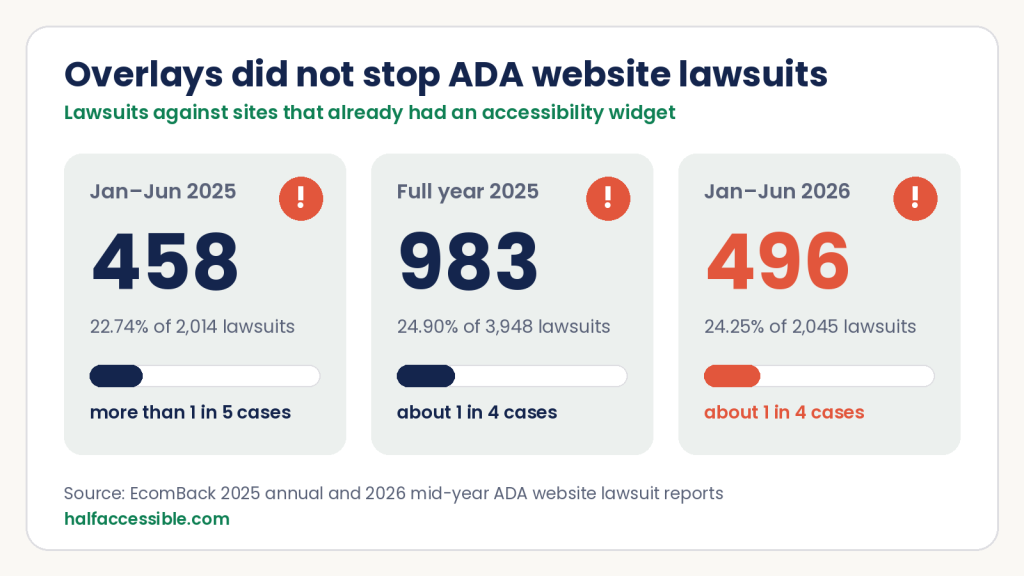
No widget, including accessiBe, UserWay or AudioEye, protects a website from ADA lawsuits. EcomBack counted 496 of the 2,045 ADA website lawsuits filed from January to June 2026 (24.25%) against websites that already had an accessibility widget installed, after 983 of 3,948 (24.90%) in 2025. That is about 1 in 4 cases. If you have one on your site today, our $500 Quick Audit tests up to 5 templates with the widget on and off and gives you a ranked top-10 issues report. Updated October 7, 2026 with mid-year 2026 lawsuit data.
Figures At A Glance
| Figure | What it means | Source |
|---|---|---|
| 496 of 2,045 | ADA website lawsuits from January to June 2026 hit sites that already had an accessibility widget (24.25%) | EcomBack 2026 mid-year report (opens in a new tab) |
| 983 of 3,948 | ADA website lawsuits in 2025 named sites with a widget installed (24.90%) | EcomBack 2025 annual report (opens in a new tab) |
| million | Paid by accessiBe under the FTC final order of April 2025 over deceptive WCAG-compliance claims | Federal Trade Commission (opens in a new tab) |
| 1,000+ | Accessibility professionals signed the Overlay Fact Sheet saying overlays do not make sites accessible | Overlay Fact Sheet (opens in a new tab) |
Choose Your Next Step
Running an overlay today? Most teams start with a free scan (widget off), then a free 30-minute call to scope removal and real fixes. The 0 one-hour technical consultation is for teams that already have scan results, a demand letter, or need a developer on a live walkthrough. Full packages are on the pricing page. For code-level removal and remediation, see accessibility overlay replacement and website accessibility remediation.
- Free 30-minute call (best for first conversations). A first discussion to understand where your site stands with the widget on or off, agree scope and start a quote. Book a free 30-minute call (opens in a new tab).
- Overlay replacement or remediation (best when you want the widget gone). Use accessibility overlay replacement for audit-with-widget-off, source fixes and safe removal, or website accessibility remediation when the barrier list is already clear. Packages start at the 0 Quick Audit and the ,000 Complete Audit (Shopify audits are ,000).
- 0 technical hour (best when you need an expert now). Walk through audit findings, talk with your developer, or review live issues on a shared call. Book the 0 one-hour technical consultation.
- Free starting scan (best for a quick first look). Run a free one-page WCAG scan on AccessibilityScore.in (linked earlier in this guide) with your widget switched off. It is a starting point; a manual audit still finds barriers automated checks miss.
Key Takeaways
- In April 2025 the FTC approved a final order requiring accessiBe to pay $1 million over claims that its widget could make any website WCAG-compliant.
- In 2025, 3,948 ADA website accessibility lawsuits were filed in the US, a 23.84% increase over 2024.
- 496 of the 2,045 ADA website lawsuits filed in the first half of 2026 (24.25%) targeted websites that already had an accessibility widget installed, up from 458 (22.74%) in the same period of 2025. For all of 2025 the figure was 983 of 3,948 (24.90%).
- Overlays have been named in court: in Murphy v. Eyebobs (2021), a blind shopper said the accessiBe overlay on an eyewear store made the site harder to use, and the class settlement required an outside accessibility consultant and WCAG 2.1 conformance.
- More than 1,000 accessibility professionals, including contributors to the WCAG, ARIA, and HTML specifications, have signed the Overlay Fact Sheet stating overlays do not achieve compliance.
- Screen readers like JAWS, NVDA, and VoiceOver interact with the HTML DOM, not with overlay scripts. Overlays cannot fix barriers in code they do not change.
- Genuine ADA compliance requires fixing the underlying HTML, CSS, and JavaScript through real remediation and manual testing, starting with a manual accessibility audit.
What Is an Accessibility Overlay?
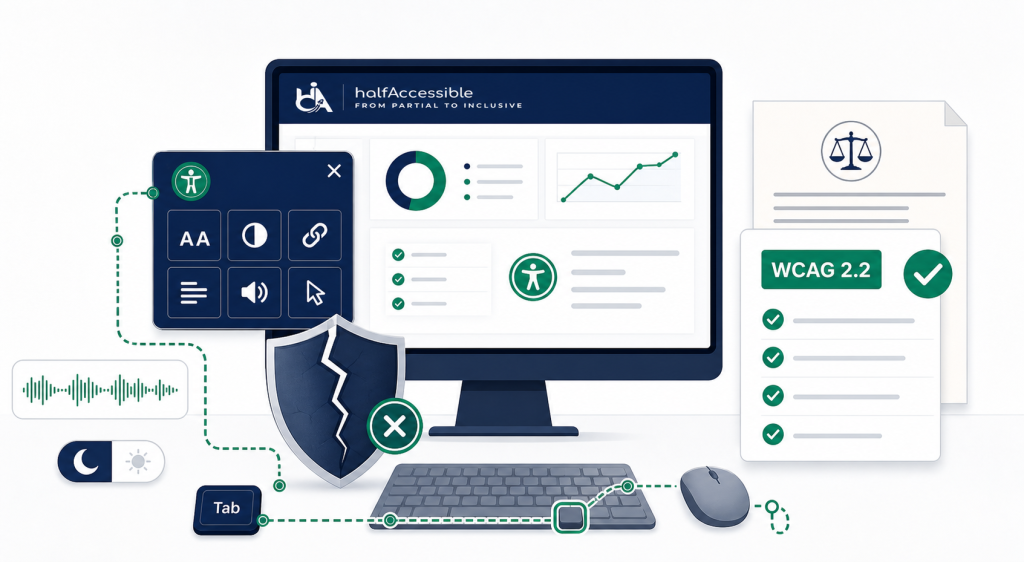
An accessibility overlay is a third-party JavaScript widget, typically a small floating button on the corner of a web page, that claims to automatically fix accessibility issues without changing your website’s underlying source code. Well-known overlay products include accessiBe, UserWay, and AudioEye.
The sales pitch is simple: install a script tag, pay a monthly subscription, and your site becomes “accessible” and “ADA compliant.”
The technical reality is that an overlay sits on top of your existing HTML, CSS, and JavaScript. It does not rewrite your source code. Instead, it attempts to inject modifications in real time using AI or rule-based heuristics, adding alt text attributes, adjusting colour contrast, or modifying focus behaviour after the page has already loaded in the browser.
This approach has one structural flaw that no amount of AI can solve. Screen readers do not interact with overlays. They interact with the DOM.
Why Accessibility Overlays Do Not Work for Screen Reader Users
When a person with a visual disability visits your website using a screen reader like NVDA, JAWS, or VoiceOver, the screen reader parses the HTML document directly. It reads the DOM tree as the browser rendered it. It does not wait for a third-party script to finish modifying the page.
Here is what this means in practice:
Missing alt text. If your image has no alt attribute in the HTML, the screen reader announces “image” or reads the filename. The overlay may detect the missing attribute and plan to inject a description, but by the time that injection runs, the screen reader has already moved to the next element.
Unlabelled form inputs. If your form field has no associated <label> element, a JAWS user hears only the input type with no context about what to type. The overlay’s automatic labelling logic runs after DOM load, but the timing does not reliably align with how assistive technology reads the page.
Keyboard focus traps. If a modal dialog on your site traps keyboard focus behind it, a keyboard-only user is stuck. An overlay script layered on top of broken JavaScript focus management cannot retroactively fix the logic baked into your components.
Custom widget failures. ARIA-based components like accordion menus, tab panels, and date pickers require specific keyboard interaction patterns defined by the ARIA Authoring Practices Guide (APG). An overlay cannot rewrite the event listeners that handle those interactions.
Practitioners agree. In the WebAIM Survey of Web Accessibility Practitioners (758 responses), 67% rated overlays, plugins and widgets as not very or not at all effective, and among respondents with disabilities that rose to 72%. Some overlays also add their own “screen reader mode”, which can conflict with the screen reader the visitor already uses.
Users say the same. In a peer-reviewed study presented at ACM ASSETS 2024, The Promise and Pitfalls of Web Accessibility Overlays for Blind and Low Vision Users (Makati, Tigwell and Shinohara), participants said overlays often conflicted with their own assistive technology, and survey respondents were significantly less likely to go back to a website after they met an overlay on it. In other words, a widget can cost you the very customers it is meant to serve.
I have tested websites with overlays installed. I turned the overlay on. I opened the page with NVDA running. The barriers were still there. The overlay added a floating button and a settings panel. The underlying accessibility failures remained exactly as they were before installation.
What the FTC and Courts Have Said
The FTC Ordered accessiBe to Pay $1 Million
On April 22, 2025, the Federal Trade Commission approved a final order requiring accessiBe to pay $1 million for falsely claiming its AI-powered widget could make any website compliant with WCAG for people with disabilities. The order bars accessiBe from representing that its automated products can make any website WCAG-compliant unless it has evidence to support that claim.
This is not a minor regulatory note. The United States federal government’s consumer protection authority alleged that the core marketing claim of the accessibility overlay industry — “install our widget, get compliance” — was false, and the company paid $1 million and agreed to stop making it without evidence.
Overlays Do Not Stop Lawsuits
According to EcomBack’s 2025 ADA Website Lawsuit Annual Report, 3,948 ADA website accessibility lawsuits were filed in the US in 2025, a 23.84% increase over 2024. The first half of 2025 alone saw 2,014 lawsuits, a 37% jump over the same period in 2024.
More specifically: by the end of 2025 EcomBack counted 983 lawsuits (24.90%) against websites that had accessibility widgets installed. The trend has not reversed in 2026. EcomBack’s 2026 mid-year report counts 496 widget cases (24.25%) out of 2,045 from January to June, up from 458 (22.74%) in the same period of 2025. Widget cases jumped 32.1% in the first quarter (276 against 209) and dipped in the second (220 against 249), so the share still sits at about 1 in 4. UsableNet, which tracks federal and state filings, counted 91 defendants sued while using a widget among 360 lawsuits in September 2026. An overlay on your site is not a shield. For the full picture by state, industry and repeat filer, see our ADA website lawsuit statistics for 2026.
TestParty, which sells its own accessibility product, reports that more than 800 businesses with accessiBe installed were still sued for ADA website accessibility violations. The overlay did not prevent the lawsuits. Plaintiffs’ attorneys test websites with real screen readers. When those screen readers find barriers, the legal claim holds.
Accessibility Overlay Lawsuits: The Eyebobs Class Action
The best-known accessibility overlay lawsuit is Murphy v. Eyebobs, filed in January 2021 in the US District Court for the Western District of Pennsylvania (No. 1:21-cv-00017). Anthony Murphy, a blind screen reader user, sued the eyewear retailer Eyebobs. His complaint said the store had installed an accessiBe overlay and that the overlay did not give screen reader users full and equal access, and in some cases made the site impossible to use.
Eyebobs denied the claims but settled as a class action. In October 2021 the court granted preliminary approval of a settlement that required Eyebobs to make the US website accessible within 24 months, measured against WCAG 2.1 including WAI-ARIA, to hire an outside accessibility consultant and to dedicate staff to accessibility. Murphy received a $1,000 incentive award, and Eyebobs told WIRED it no longer works with accessiBe. The lesson for any business: the overlay was the problem in the complaint, and the fix the court approved was the manual audit and code remediation the overlay was supposed to replace.
What About AudioEye, UserWay and Other Widget Vendors?
The FTC order applies to accessiBe, but the technical limit applies to every runtime widget. AudioEye, for example, describes its own product as delivering “automated remediations and continuous monitoring for accessibility issues without making fundamental changes to website architecture, source code, or browser-based tools” (AudioEye press release, October 2022). Some vendors now sell manual testing, legal support or a “guarantee” alongside the script. Before you rely on any of them, ask four questions:
- Does the product change your source code, or only patch the page in the browser after it loads?
- Are the results checked by certified people using NVDA, JAWS and VoiceOver, with WCAG 2.2 criteria cited for every issue?
- Will they give you documentation, such as an audit report or a VPAT / ACR, based on that manual testing?
- What exactly does the “guarantee” cover: legal fees, a response to a demand letter, or actual WCAG conformance?
If the answers are “browser only”, “automated”, “no” and “legal support”, you are paying for a subscription, not for accessibility. A $500 Quick Audit will show you what your widget is and is not fixing on your own templates.
The DOJ Adopted WCAG 2.1 AA for State and Local Governments
In April 2024, the US Department of Justice finalized a rule under ADA Title II requiring state and local government websites and mobile applications to conform to WCAG 2.1 Level AA. An interim final rule published on April 20, 2026 moved the compliance dates to April 26, 2027 for entities serving 50,000 or more people and April 26, 2028 for smaller entities and special districts (see our DOJ Title II deadline guide). The rule does not say “installing a widget counts as conformance.” It says the underlying site must meet the technical standard.
Private businesses fall under ADA Title III instead. There the DOJ has not adopted a technical standard in regulation, but its web accessibility guidance says businesses can use WCAG and the Section 508 Standards as helpful guidance.
The Overlay Sales Pitch vs. What Actually Happens
| What overlay vendors claim | What actually happens |
|---|---|
| “AI automatically fixes your site” | Scripts inject changes after DOM load; screen readers read before the changes apply |
| “Instant WCAG 2.1 or 2.2 compliance” | The FTC alleged this claim was “false, misleading, or unsubstantiated” and the April 2025 order bars it without evidence |
| “Protection from ADA lawsuits” | 496 of 2,045 ADA website lawsuits in the first half of 2026 (24.25%), and 983 of 3,948 in 2025 (24.90%), targeted sites with accessibility widgets installed |
| “Meets Section 508 requirements” | Section 508 requires actual ICT conformance; overlays do not achieve it |
| “Works for all disabilities” | 67% of accessibility practitioners, and 72% of those with disabilities, rate overlays not very or not at all effective |
What 1,000+ Accessibility Experts Have Officially Stated
The Overlay Fact Sheet is a public statement signed by more than 1,000 accessibility professionals, including contributors and editors for the WCAG, ARIA, and HTML specifications, and internal accessibility experts from Google, Microsoft, Apple, Shopify, eBay, and Target. It states:
“No overlay product on the market can cause a website to become fully compliant with any existing accessibility standard and therefore cannot eliminate legal risk.”
Disability organisations have spoken out too. In June 2021 the National Federation of the Blind revoked accessiBe’s convention sponsorship, and its convention then passed Resolution 2021-17 condemning accessiBe’s “disrespectful and misleading marketing and business practices.”
This is not a fringe opinion. It is the consensus of the people who wrote the standards overlays claim to satisfy.
The Overlay Widget Is Often Inaccessible Itself
This is the detail that is hardest to believe until you test it firsthand.
I have tested overlay control panels with VoiceOver on iOS and NVDA on Windows. Here is what I find regularly:
The trigger button has no accessible name. A screen reader user hears “button” with no description of what it does.
The control panel opens after activation, but keyboard focus does not move into the panel. A keyboard user who just opened the accessibility settings cannot actually use those settings.
Options within the panel like “increase text size” or “high contrast mode” are built as div elements with click handlers rather than native button elements. They are not in the tab order. A keyboard user cannot reach them.
Closing the panel returns focus to the top of the page instead of back to the trigger button where the user was before opening it.
An accessibility solution that is itself inaccessible to the people it claims to serve is not a compliance product. It is a product designed to look like one.
What WCAG 2.2 Level AA Actually Requires
WCAG 2.2 is the current version of the Web Content Accessibility Guidelines, published by the World Wide Web Consortium (W3C). The DOJ Title II rule adopts WCAG 2.1 AA, and WCAG 2.2 AA includes every WCAG 2.1 AA requirement plus new ones, so it is the standard our team tests against on every engagement.
Meeting WCAG 2.2 Level AA requires that your website actually work for users with disabilities. Not that it appear to try. The key requirements include:
Text alternatives (Success Criterion 1.1.1): Every meaningful image, icon, and non-text element has a text alternative that conveys the same information.
Keyboard accessibility (Success Criteria 2.1.1 and 2.1.2): Every function available by mouse is available by keyboard. No keyboard traps exist anywhere on the site.
Focus visible and not obscured (Success Criteria 2.4.7 and 2.4.11, new in WCAG 2.2): Keyboard focus is always visible, and the focused element is not hidden behind sticky headers, cookie banners, chat bubbles or floating overlay buttons.
Labels and instructions (Success Criteria 1.3.1 and 3.3.2): Form inputs have programmatically associated labels. Instructions appear before the fields they describe.
Error identification (Success Criteria 3.3.1 and 3.3.3): Error messages identify which field failed and describe how to fix it. Status messages, such as “form submitted” or “3 errors found”, are announced to screen reader users without moving focus (Success Criterion 4.1.3).
Name, Role, Value (Success Criterion 4.1.2): Every user interface component has an accessible name, the correct ARIA role, and its current state exposed to assistive technology.
None of these requirements are met by injecting a script on top of broken code. They are met by writing correct HTML, using semantic elements, managing focus properly in JavaScript, and verifying everything with real screen reader testing. See our accessibility audit service for how we test against each of these criteria.
How to Actually Achieve ADA Compliance
Step 1: Get a manual accessibility audit
Automated testing tools like axe, Lighthouse, and WAVE only find part of the problem. Even in Deque’s own study of real audits, automated tests identified about 57 percent of issues by volume, and many WCAG success criteria still need human judgement. The failures they catch are real, but the ones they miss are the ones that make a site genuinely unusable. Focus traps. Reading order errors. Dynamic content that is never announced. Broken keyboard patterns in custom components. These require a person using a screen reader to find.
A manual accessibility audit led by our founder, who holds the IAAP CPACC, WAS and CPWA certifications, using JAWS, NVDA, and VoiceOver tells you what your site actually looks like to a blind user. Every finding maps to a WCAG 2.2 success criterion, a severity level, and a developer-ready fix.
Our audit pricing is fixed: the $500 Quick Audit covers up to 5 templates with a top-10 issues report, and the $2,000 Complete Audit is a full manual WCAG 2.2 audit of up to 25 templates. Running a store on Shopify? The Shopify Accessibility Audit ($2,000) covers the storefront, product pages, cart and checkout, where overlay apps are most common. You can see exactly what you get in our sample audit report.
Step 2: Fix the underlying code
Accessibility remediation means changing the HTML, CSS, and JavaScript that produces the barriers. Not adding a script on top. Not sprinkling ARIA attributes randomly hoping they help. (Incorrect ARIA use is worse than no ARIA. It gives screen reader users wrong information about the page.)
Every fix is tied to the audit finding that surfaced it and re-tested after implementation to confirm it is actually closed.
Step 3: Document your conformance
An accessibility statement on your website documents your current conformance level, the standard you tested against, any known remaining issues, and how users can report new barriers. WCAG itself does not require one, but it is good practice everywhere. EU public-sector websites must publish one under the Web Accessibility Directive, and the European Accessibility Act requires covered businesses to publish information on how their services meet its accessibility requirements.
For software products sold to enterprise or government buyers, a VPAT (Voluntary Product Accessibility Template) is the required conformance document in procurement. It must be based on real testing, not self-certification.
Step 4: Build accessibility into your release process
Accessibility conformance is not a one-time state. New features introduce new components. Code changes introduce regressions. An accessibility review before launch and a post-release check after deployment prevents the accumulation of issues that becomes a lawsuit. Our accessibility monitoring and governance service does this on a schedule.
Alternatives to Accessibility Overlays That Actually Reduce Risk
If you want something that goes beyond an overlay widget, the answer is not a better widget. It is moving the work into your code and your release process, where it lasts:
- Manual audit first. A certified tester uses your site with a keyboard and screen readers and maps every barrier to a WCAG 2.2 success criterion. This is the baseline every other step depends on.
- Fix the source code. Real labels, alt text, focus management and ARIA patterns in your templates and components, so every visitor gets the fix, including people who block widgets.
- Automate checks in development, not in the browser. Tools such as axe-core and Lighthouse run in your build pipeline and catch regressions before release. See our guide to automated accessibility testing for what they can and cannot catch.
- Build on accessible platforms. If you are on WordPress or Shopify, accessible themes and components remove whole classes of issues. See accessible WordPress development and accessible Shopify development.
- Monitor after launch. Scheduled re-tests through accessibility monitoring and governance keep new content and features from reopening old barriers.
- Leave personal settings to the visitor. Text size, zoom, contrast and reading modes already exist in browsers and operating systems, and disabled users have them set up the way they like. A widget that duplicates them adds little.
Here is how the options compare on what actually matters if a demand letter arrives:
| Option | Changes your code? | Manual screen reader testing? | Documentation you can show an attorney or buyer | Price |
|---|---|---|---|---|
| Overlay or widget subscription | No, it patches the page in the browser | Usually no | A subscription receipt and the vendor’s own statement | Ongoing monthly or yearly fee |
| Accessibility consultation | No, it gives you a plan | Expert review of your risk and priorities | A prioritised action plan | $100 (1 hour) |
| Quick Audit | Shows exactly what to change | Yes, up to 5 key templates | Top-10 issues report with WCAG references | $500 |
| Complete Audit | Shows exactly what to change, then re-tests | Yes, NVDA, JAWS and VoiceOver, up to 25 templates or flows | Full WCAG 2.2 AA report and re-test | $2,000 |
| Shopify Accessibility Audit | Shows what to change in your theme and apps | Yes, storefront, product pages, cart and checkout | Shopify-specific WCAG report | $2,000 |
Not sure which one fits your site? Our free accessibility needs assessment asks a few questions and points you to the right audit, and our accessibility audit cost guide explains what drives the price.
What to Do If You Already Have an Overlay Installed
Stop treating it as your compliance posture.
If you installed an overlay after receiving an ADA demand letter, the overlay does not address the legal claim. A genuine audit with documented findings, a prioritised remediation plan, and evidence of good-faith remediation effort is what your attorney needs, not a SaaS subscription receipt.
Read our full guide on what to do after receiving an ADA demand letter for the exact steps to take, including how a certified audit protects your legal position.
We can audit your site with the overlay present or removed. We will tell you honestly what barriers remain, what the overlay modifies if anything, and what genuine remediation would require. Our accessibility overlay replacement service covers the whole move: a manual audit with the widget switched off, source-code fixes, safe removal of the script and a retest with screen readers. If a lawsuit has already been filed, our ADA lawsuit remediation service fixes and retests the barriers named in the complaint and documents the work. Most 2025 filings targeted consumer-facing websites, so online stores should also read our ecommerce accessibility page and our guide to making a Shopify store ADA compliant.
The Bottom Line
The evidence is clear. The FTC alleged that accessiBe’s compliance claims were false, misleading, or unsubstantiated, and its final order bars them without evidence. Overlays have not stopped lawsuits being filed: about 1 in 4 ADA website lawsuits in 2025 (983 of 3,948) and in the first half of 2026 (496 of 2,045) targeted sites with a widget installed, and in Murphy v. Eyebobs the overlay itself was part of the complaint. More than 1,000 accessibility professionals, including people who wrote the standards overlays claim to satisfy, have signed a public statement saying overlays cannot make a site compliant.
The only path to genuine ADA compliance, and to a website that works for the more than 1 in 4 US adults (28.7 percent) living with some form of disability, is fixing the code.
That work is not as expensive or slow as overlay vendors want you to believe. Audits start at $500, and turnaround depends on the size of your site; we confirm a specific timeline once we have reviewed it. Remediation of the critical barriers can follow straight after. The result is a website that genuinely works, with documentation your attorney can use if it ever comes to that.
Get an Honest Assessment of Your Site
If you want to know what your site actually looks like to a screen reader user, with or without an overlay installed, we can tell you.
Start a $500 Quick Audit or get a free accessibility needs assessment to find the right audit for your site.
We audit against WCAG 2.2 Level AA using JAWS, NVDA, and VoiceOver on real browsers and devices. Every finding has a criterion reference, a severity rating, and a fix. No upselling, no overlay widgets, no monthly fees for a script that does not work. Prefer to talk it through first? Book a free 30-minute call to tell us which overlay you use and get a quote, or, if your developer needs hands-on technical answers now, book a 1-hour consultation ($100) to review findings live. You can also compare all plans on our pricing page.
See our Accessibility Audit service, our Remediation service, our ADA lawsuit remediation service, or our ADA compliance guidance if you have already received a demand letter.
HalfAccessible Private Limited is a digital accessibility consultancy registered in India, serving clients in the US, EU, and globally. Every audit is led by our founder, who holds the IAAP CPACC, WAS and CPWA certifications and has 10+ years of accessibility testing experience; the team also holds DHS Trusted Tester certification.