You do not need a lawyer to sue a business for ADA violations anymore.
AI ADA lawsuits (accessibility claims filed without attorneys, powered by tools like ChatGPT) have become a routine legal risk for businesses with public-facing websites. That changed quietly over the past two years, and most business owners have no idea it happened.
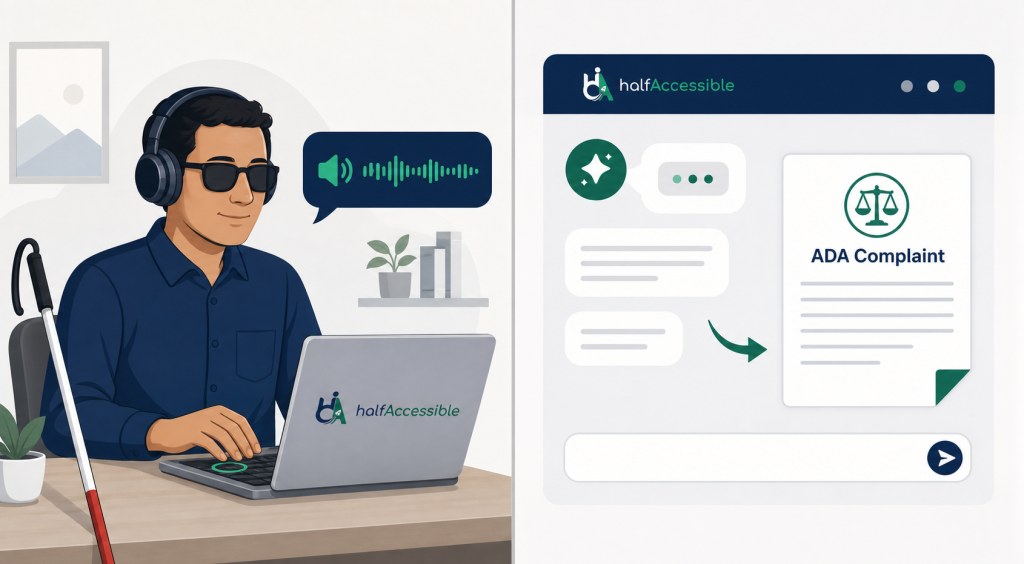
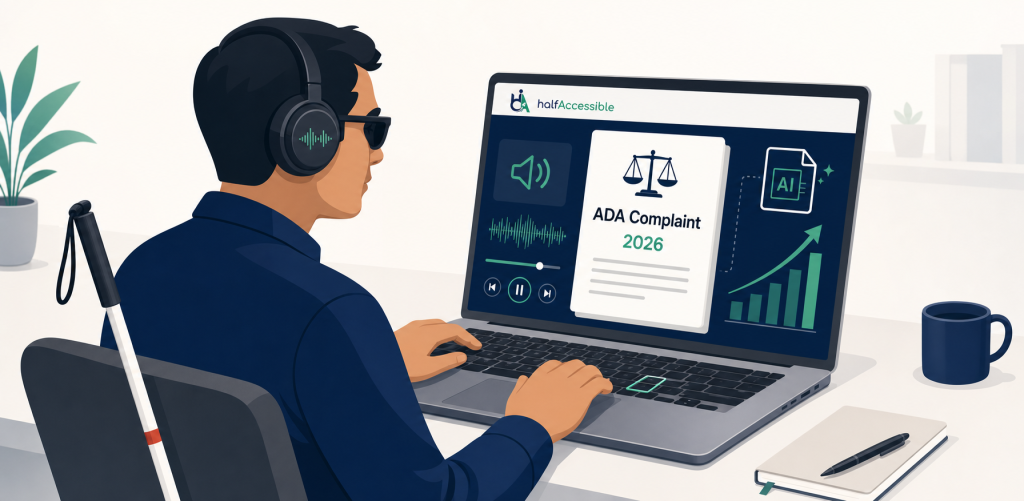
People with disabilities are now using ChatGPT, Microsoft Copilot, and Google Gemini to scan websites for WCAG violations, draft federal complaints, and file them in court. Filing used to mean finding and paying a lawyer first. Now a first draft of a complaint can take an afternoon.
The results are showing up in the data. Seyfarth Shaw found 40% more federal pro se ADA Title III lawsuits in 2025 than in 2024 (based on average monthly filings) and links the jump to AI tools. Across all types of claims, 8,667 federal ADA Title III lawsuits were filed in 2025, and Seyfarth counted 3,117 of them as website accessibility cases. Counting key state courts in New York and California as well, UsableNet tracked 5,114 digital accessibility lawsuits in 2025 (3,195 federal and 1,919 in New York and California state courts). Its 2026 Midyear Report projects about 6,176 for 2026, which would be a new record.
If your website has accessibility barriers, someone with a smartphone and a free AI subscription can find them and sue you from their living room.
This post explains how that works, what AI is looking for on your website, who is being targeted, and what you can actually do about it.
Key Takeaways
- Pro se ADA lawsuits (filed by individuals without attorneys) surged 40% in 2025, largely driven by AI tools like ChatGPT and Microsoft Copilot.
- 8,667 federal ADA Title III lawsuits of all types were filed in 2025, 3,117 of them over website accessibility (Seyfarth). UsableNet projects about 6,176 digital accessibility lawsuits in 2026, a record high.
- Ecommerce is the main target: 79% of digital accessibility lawsuits in the first half of 2026 named ecommerce businesses (UsableNet), and Shopify stores drew 46.55% of the website lawsuits EcomBack counted.
- The WCAG failures that show up again and again in complaints are low contrast text, missing alt text, unlabeled form fields, empty links and buttons, keyboard traps, and missing page language.
- Accessibility overlays do not help. In 2025, 983 of 3,948 ADA website lawsuits (24.90%) targeted sites that already had an accessibility widget installed, and 24.25% of website lawsuits filed in the first half of 2026 did too (EcomBack).
- The National Federation of the Blind sued the DOJ and HHS on May 21, 2026 to undo the one-year delays to the ADA Title II and Section 504 web accessibility deadlines.
- Audit first, then fix, re-test and monitor. A $500 Quick Audit or a $2,000 Complete Audit costs a fraction of one lawsuit, which TestParty estimates at $55,000 to $270,000+ all in.
- The only reliable protection is fixing the actual code. A professional WCAG 2.2 accessibility audit shows you exactly what needs fixing and in what order.
What Is a Pro Se ADA Lawsuit?
“Pro se” is a Latin term meaning “for oneself.” A pro se plaintiff is someone who files a lawsuit without hiring a lawyer. In most areas of law, this is rare because the legal drafting alone is complex enough to discourage it.
ADA website cases changed that equation.
The legal theory in an ADA Title III website case is relatively straightforward: a public accommodation (a business that serves the public) has a website, the website has barriers that prevent someone with a disability from using it equally, and that is a violation of the ADA. The key facts are technical, not legal: the specific WCAG criterion violated, how it caused the barrier, and what the plaintiff experienced.
That technical part is exactly what AI tools do well.
A blind plaintiff can describe what happened when they tried to use a website with their screen reader. They can paste the page source or a WCAG audit result into ChatGPT. The AI identifies the specific WCAG success criteria that were violated, explains the legal theory in plain language, and drafts a complaint. The plaintiff reviews it, corrects anything that does not match their experience, and files.
Courts have seen a sharp increase in this pattern. Seyfarth Shaw’s ADA Title III litigation blog noted that federal pro se ADA Title III and FHA filings are up significantly and that AI is the likely driver. Some plaintiffs are filing dozens of cases at a time.
This is not a loophole. People with disabilities have a legal right to sue under the ADA. AI has simply removed the financial barrier to exercising that right.
How Big Is the ADA Lawsuit Problem in 2026?
The numbers from 2025 make clear this is not a niche legal issue. For the full breakdown by state, industry, and platform, see our ADA website lawsuit statistics for 2026.
UsableNet’s 2025 year-end report counted 5,114 digital accessibility lawsuits in 2025, a record, and its 2026 Midyear Report projects about 6,176 for 2026, roughly 20% more. Federal ADA Title III filings of all types reached 8,667 in 2025. EcomBack’s 2025 count of federal and state website accessibility lawsuits was 3,948, up 23.84% on 2024. Our ADA website lawsuit statistics for 2026 break these numbers down further.
Ecommerce is the primary target. UsableNet found that 79% of digital accessibility lawsuits filed in the first half of 2026 named ecommerce businesses, and EcomBack counted 952 lawsuits (46.55%) against Shopify stores in the same period, up from 653 (32.42%) a year earlier.
Settlements can get very large. In Alcazar v. Fashion Nova, a class action brought by blind shoppers who use screen readers, the parties proposed a $5.15 million settlement. The Department of Justice asked the court to reject it on February 2, 2026, arguing it gave class members little real value while the plaintiffs’ lawyers sought over $2.52 million in fees, and the court held an evidentiary hearing on March 30, 2026. Most cases are far smaller, but none are cheap: TestParty estimates a typical ADA website case costs $55,000 to $270,000+ once the settlement ($30,000 to $100,000+), defense fees, required remediation and verification audits are added up.
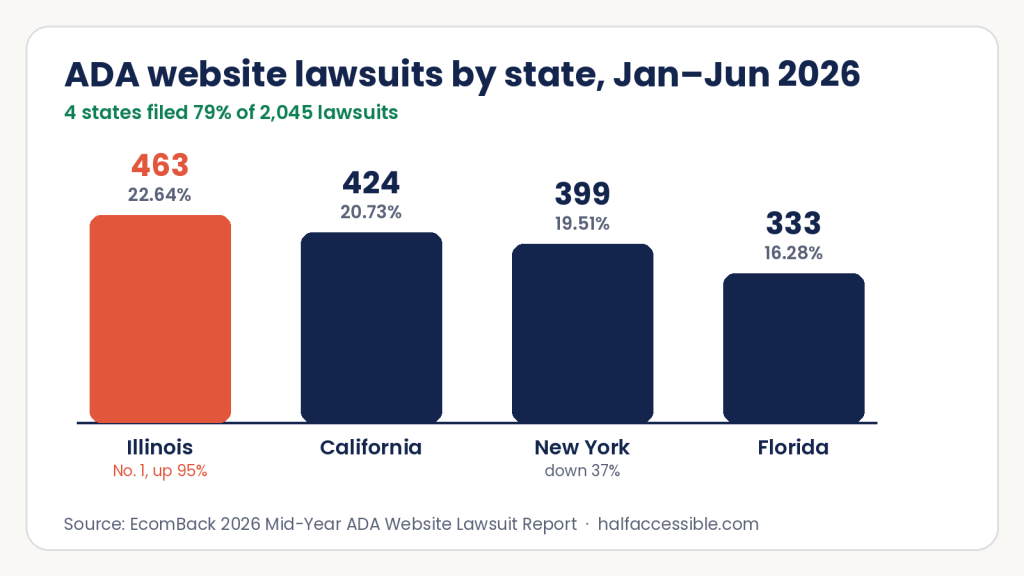
The geography is shifting. In EcomBack’s count for January to June 2026, Illinois became the top state with 463 filings (22.64%, up 95.36%), followed by California (424), New York (399, down 37.36%) and Florida (333). Together those four states filed 79% of all 2,045 cases, and Indiana was the fastest-growing state, up from 28 filings to 105.
What Is AI Looking for on Your Website?
This is the part most businesses do not think about.
When a pro se plaintiff uses an AI tool to evaluate a website, the AI is not just running a general scan. It is being told to look for specific, legally actionable failures against the Web Content Accessibility Guidelines (WCAG) published by the W3C. And it is good at finding them because most websites have them on every page.
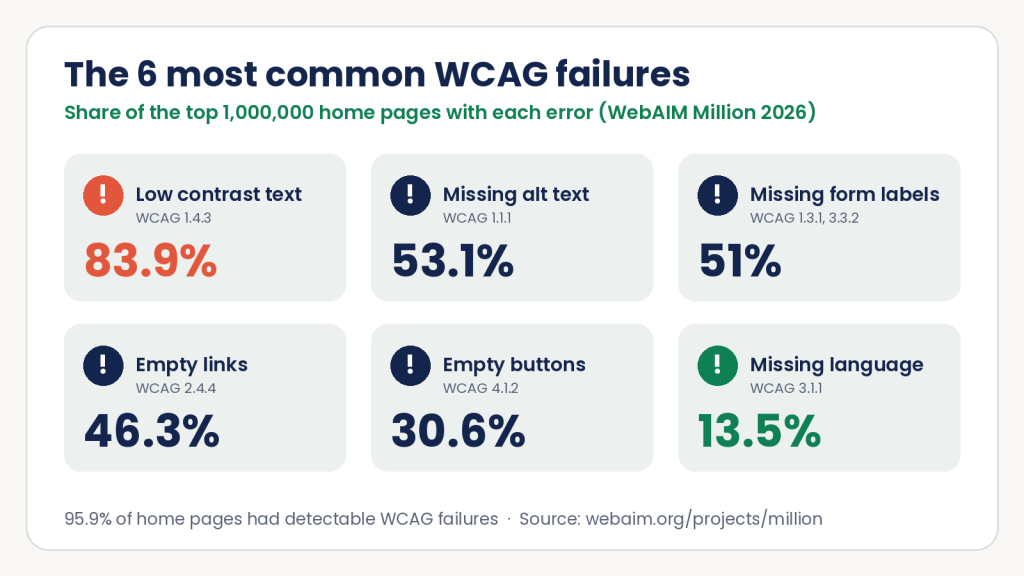
These are the failures that show up most often in complaints, and WebAIM’s annual scan of the top one million home pages shows how common they are:
1. Missing alt text on images (WCAG 1.1.1) Screen readers read alt text aloud to blind users. If a product image, banner, or icon has no alt text or has a filename like “img_7234.jpg,” a screen reader user gets either silence or a string of characters that means nothing. In ecommerce, this means a blind shopper cannot know what they are looking at. WebAIM found missing alt text on 53.1% of home pages in 2026.
2. Low contrast text (WCAG 1.4.3) 83.9% of home pages had low contrast text in WebAIM’s February 2026 scan, up from 79.1% in 2025. Gray text on a white background, light text on a light image, and faded placeholder text in form fields all fail. Users with low vision cannot read them. WCAG requires a 4.5:1 contrast ratio for normal text and 3:1 for large text.
3. Unlabeled form fields (WCAG 1.3.1, 3.3.2) Missing form labels appeared on 51% of home pages in 2026. When a form field has no programmatic label, a screen reader user lands on a text box with no indication of what belongs there. They cannot complete signup forms, checkout forms, or contact forms independently.
4. Empty links and buttons (WCAG 2.4.4, 4.1.2) 46.3% of home pages have empty links and 30.6% have empty buttons: controls with no text a screen reader can announce, such as an icon-only link with no label. Screen reader users often navigate by pulling up a list of all links on a page. A list of unnamed links, or of vague “click here” links (found on 15.2% of pages), is useless. They cannot tell which link goes where without reading the surrounding text every time.
5. Keyboard navigation failures (WCAG 2.1.1) People who cannot use a mouse rely entirely on keyboard navigation. Tab through your website. If you cannot reach every interactive element, activate it, and move past it using only the keyboard, keyboard-only users are locked out. Modal dialogs that trap keyboard focus and carousels with no keyboard controls are extremely common lawsuit targets. Our manual keyboard accessibility testing guide walks through this check step by step.
6. Missing document language (WCAG 3.1.1) 13.5% of home pages do not declare their language in the HTML. Screen readers use the declared language to select the correct voice and pronunciation. Without it, a page in English may be read aloud using a French or Spanish voice model, making it incomprehensible.
These are not edge cases. In the WebAIM Million 2026, 95.9% of the top one million home pages had automatically detectable WCAG 2 failures, up from 94.8% in 2025, with an average of 56.1 errors per page.
An AI tool given a URL can identify most of these failures in minutes.
How AI ADA Lawsuits Get Filed Faster Than You Expect
Here is what the process looks like in practice, based on reporting from Deque’s analysis of AI-powered pro se lawsuits and Accessibility.Works.
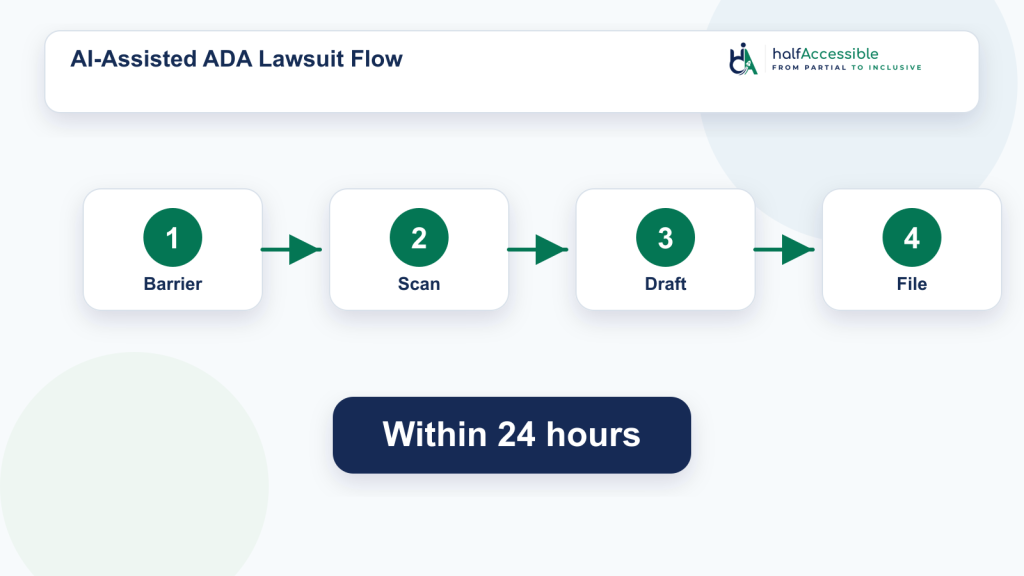
A plaintiff or their advocate visits your website with a screen reader. They encounter a barrier: a product image with no description, a checkout button that is unreachable by keyboard, or a form that announces nothing when submitted. They note the URL and the specific interaction that failed.
They then take one of two approaches. They paste your website’s source code or an automated scan output into ChatGPT and ask it to identify WCAG violations. Or they describe the experience and ask ChatGPT to map it to the relevant WCAG success criteria and ADA requirements. In either case, the AI returns a structured list of violations with the specific criterion number, the technical explanation, and the legal impact.
That output goes into a complaint draft. The AI produces a legally structured document naming the business, describing each barrier, citing the WCAG criteria and ADA sections, and requesting injunctive relief and damages.
The plaintiff files it in federal court, often in a jurisdiction they know is favorable.
You receive a summons.
The entire process from visit to filing can take one business day.
What Are the Real Regulatory Stakes in 2026?
Beyond private lawsuits, federal regulators are tightening the rules, and advocacy groups are pushing back on any delays.
In April 2026, the DOJ issued an interim final rule extending ADA Title II WCAG 2.1 AA deadlines for state and local governments. Phase 1 (larger entities) moved from April 24, 2026 to April 26, 2027. Phase 2 (smaller entities) moved to April 26, 2028. The ADA.gov fact sheet on the Title II web rule explains the underlying requirement. Full Federal Register details are here.
The National Federation of the Blind did not accept this quietly. On May 21, 2026, NFB sued the DOJ and HHS in the US District Court for the District of Maryland, challenging the deadline extensions as violations of the Administrative Procedure Act. NFB argues the agencies issued the interim rules without required public notice and comment, and that the delays cause concrete harm to people with disabilities who depend on accessible government services.
HHS extended its own Section 504 web and mobile deadline in a separate interim final rule. HHS-funded organizations with 15 or more employees now have until May 11, 2027 (moved from May 11, 2026), and smaller recipients until May 10, 2028. The NFB lawsuit challenges both extensions.
For private businesses, ADA Title III continues to apply without the deadline extensions, which only cover government entities. Private ecommerce sites, SaaS products, and consumer-facing apps remain exposed to litigation today under existing Title III standards.
Does an Overlay Protect You?
No. This comes up constantly and the answer is still no.
EcomBack’s 2025 annual report counted 983 of 3,948 ADA website lawsuits (24.90%) against websites that already had an accessibility overlay widget installed. These are the tools that promise to make your site compliant via a JavaScript snippet. Those businesses were still sued.
The pattern has not changed in 2026. EcomBack’s 2026 mid-year report counted 2,045 ADA website lawsuits filed from January to June 2026, and 496 of them (24.25%) targeted sites that already had an accessibility widget installed, a larger share than in the same period of 2025.
The Federal Trade Commission weighed in too. In April 2025 it approved a final order requiring accessiBe to pay $1 million over claims that its AI-powered widget could make any website WCAG compliant. The order bars the company from claiming its automated product can make any website WCAG compliant unless it has evidence to back that up.
Screen readers interact with your HTML directly. They do not see or process an overlay’s modifications the same way a sighted user clicking the overlay widget does. If the barrier is in your source code, it is there for assistive technology users whether the overlay is running or not.
We have tested sites with JAWS and NVDA while overlays were active. The barriers were still in the code.
We covered this in depth in our post Do Accessibility Overlays Protect You From ADA Lawsuits?, including the FTC ruling and the specific technical reasons overlays fail screen reader users. If a widget is already on your site, our overlay replacement service audits the site with it switched off, fixes the code and removes the script safely.
Real protection comes from one thing: fixing the actual code against WCAG 2.2 Level AA. Our accessibility remediation service does exactly this, delivering verified pull requests tied to specific audit findings.
Can AI-Driven Accessibility Remediation Prevent AI ADA Lawsuits?
AI is now on both sides of these cases. Plaintiffs use it to find barriers and draft complaints, and a growing group of vendors sells AI-driven accessibility remediation that promises to fix them. Some of these products are overlays. Others, such as TestParty, say they fix the source code itself. That difference matters far more than the AI label.
An overlay injects JavaScript on top of your page and leaves your code unchanged. Source-code remediation changes the HTML, CSS and JavaScript that a screen reader actually reads, so only the second can remove the barrier a complaint describes. Even then, no automated or AI tool can confirm WCAG conformance on its own. Many success criteria need human judgment: whether alt text is accurate, whether the focus order makes sense, whether an error message is understandable.
Treat vendor statistics with care, too. A claim such as “fewer than 1% of our customers have been sued” comes from the vendor and is not independently verified. Ask for evidence you could show an attorney or a procurement team.
Questions To Ask Any AI Accessibility Remediation Vendor
- Does it change our source code, or does it run as an overlay or widget on top of the page?
- Is every fix checked by a person using a keyboard and a screen reader such as NVDA, JAWS or VoiceOver, or only by automated rules?
- Will we get an audit report, or a VPAT / ACR, that maps each finding to a WCAG 2.2 success criterion?
- What exactly does any “compliance guarantee” cover: legal fees, a demand letter response, or WCAG conformance?
- How does it handle third-party widgets, PDFs and new releases that bring barriers back?
If the answers are “overlay”, “automated only” and “no report”, you are paying for a subscription, not for accessibility. The FTC order against accessiBe shows regulators take overstated AI compliance claims seriously.
Tools That Help Prevent ADA Website Lawsuits
Free tools catch a lot. Run WAVE, axe DevTools or Lighthouse on your key templates, then test the same pages with only a keyboard and with a free screen reader such as NVDA. Fix what you find and add automated checks to your release process so new barriers do not ship. Then get a manual audit for the barriers scanners cannot see, and keep watching after launch with our accessibility monitoring and governance service.
Who Is Most at Risk Right Now?
Based on 2025 and 2026 litigation patterns, the highest-risk profiles are:
Ecommerce and retail businesses. Product images with missing alt text, inaccessible checkout flows, and filter/sorting widgets that do not work with a keyboard are the most common targets. If you run an online store, this applies to you. See our ecommerce accessibility services for what we typically find and fix.
SaaS and web applications. Complex UI components like data tables, dropdown menus, and drag-and-drop interfaces have a high failure rate for keyboard navigation and screen reader compatibility. Our SaaS accessibility practice covers VPAT documentation for enterprise procurement alongside the audit work.
Healthcare organizations. Patient portals, appointment booking systems, and telehealth platforms are legally required to be accessible under Section 504 (federal funding recipients) and are increasingly targeted by pro se plaintiffs. Our healthcare accessibility services address both WCAG 2.1 AA and the HHS Section 504 requirements.
Any business that installed an accessibility overlay and stopped there. These businesses have a false sense of compliance and are actively being targeted.
Businesses that sell into Illinois, California, New York, and Florida. These four states filed 79% of ADA website lawsuits in the first half of 2026 (EcomBack). Where your customers are matters more than where your company is based.
You can explore our ADA and WCAG compliance services or contact us for guidance specific to your situation.
What Happens After You Receive an ADA Demand Letter
Most businesses first learn about their accessibility exposure not from a lawsuit filing but from a demand letter. An attorney or advocacy organization sends a letter stating that your website violates the ADA, that you have a specific number of days to respond, and that failure to respond will result in litigation.
The letter often arrives before the lawsuit. Many website claims start with a demand letter that names specific WCAG failures, often pulled straight from an automated scan or a screen reader test session. Demand letters are private, so nobody can count them precisely, but the same AI tools that find WCAG violations can draft letters at scale, and some firms send them in large batches.
You have limited time to respond. Letters usually set a short deadline. Bring in your attorney right away. If you acknowledge the issues, commit to remediation and share a documented timeline, many claims resolve without formal litigation, and a record of real good-faith work helps in any negotiation.
Settlement is the most common outcome. Most ADA website cases settle before trial. TestParty’s estimates put typical settlements at $30,000 to $100,000+, ranging from $5,000 to $15,000 for a small business that settles early to $150,000+ for enterprises and repeat defendants, with defense fees of $10,000 to $50,000+ on top. Proactive remediation almost always costs less.
Overlay installation is not a defense. A common mistake after a demand letter is to install an accessibility overlay and hope the claim goes away. An overlay does not change the code a complaint describes, and EcomBack counted 983 lawsuits in 2025 against sites that already had a widget. Fix the cited barriers in the source code instead.
What actually helps: A professionally conducted WCAG 2.2 audit, a documented remediation plan with milestones, and fast fixes to the pages cited in the letter. Our ADA lawsuit remediation guide shows the order we work in after a demand letter, and a free accessibility needs assessment is the quickest way to tell us what was alleged (we reply within 2 business days). We test and fix websites; we do not give legal advice.
Audit or Remediation First? The Order That Lowers Your Legal Exposure
Businesses often ask whether to start with an accessibility audit or go straight to remediation. If you have not received a demand letter, start with an audit. Remediation without an audit tends to fix what a scanner flags and miss the keyboard, focus and screen reader failures that plaintiffs describe. An audit gives you a prioritized list mapped to WCAG criteria, so developers fix the highest-risk journeys first: navigation, product pages, forms, cart and checkout.
If you already have a demand letter or complaint, do both at once. Test and fix the pages it names first, then audit the rest of the site so the next plaintiff does not find something new. TestParty, citing CourtListener data, reports that over 40% of accessibility lawsuits target companies that were sued before, so fixing only the cited pages leaves you exposed.
The sequence that works is audit, fix, re-test, then monitor. Our accessibility remediation service fixes the code from the audit findings, and a re-test confirms the fixes before you rely on them.
Cost is rarely the obstacle people expect. A $500 Quick Audit covers up to 5 key templates, a $2,000 Complete Audit covers up to 25 templates or user flows with a re-test, and the Shopify Accessibility Audit is $2,000. Compare that with TestParty’s estimate of $55,000 to $270,000+ for a single lawsuit. Our accessibility audit cost guide explains what drives the price.
How to Actually Reduce Your Risk
There is no legal strategy that fully replaces genuine accessibility. Businesses that try to argue around the ADA in court spend more money than businesses that fix their websites.
Here is what actually reduces risk:
1. Get a professional WCAG 2.2 AA audit. Not an automated scan. In a GOV.UK test of 10 automated tools, 29% of the barriers were found by none of them, and Deque’s study of real audits found automated tests identified about 57% of issues by volume. The failures that generate the most lawsuits (missing alt text on complex images, keyboard traps in custom components, broken screen reader announcements) require manual testing with real assistive technology. Our accessibility audit services use JAWS, NVDA, and VoiceOver, and every finding includes a developer-ready fix.
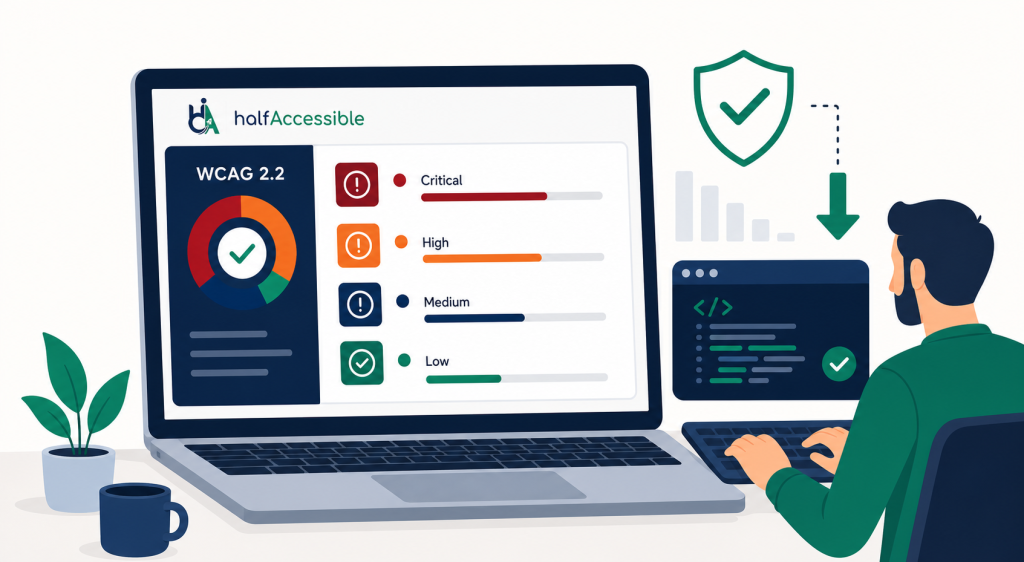
2. Fix the code. Audit findings are only useful if they get remediated. Prioritize the six failures listed earlier in this post first. They account for the most lawsuits and are typically the fastest to fix.
3. Publish an accessibility statement. A clear, accurate accessibility statement with a contact mechanism for reporting barriers signals good faith. Courts and plaintiffs both notice whether a business is making a genuine effort.
4. Produce a VPAT or ACR if you serve enterprise or government clients. If you sell to companies that require a Voluntary Product Accessibility Template, your VPAT needs to be accurate. Inaccurate VPATs have led to their own legal exposure. Our VPAT and ACR documentation service produces VPATs after real assistive technology testing. See how we delivered a procurement-ready VPAT for Happeo in 7 days.
5. Treat accessibility as ongoing, not a one-time project. Every new feature, redesign, and third-party integration can introduce new barriers. Embedding accessibility into your development process (design reviews, code review, QA) is what prevents violations from accumulating. Our accessibility monitoring and governance service handles this with scheduled scans, manual sampling, and regression alerts after launch.
The Bottom Line
AI did not create the ADA. It did not create the accessibility requirements that have applied to websites for over a decade. What AI did was remove the financial and logistical barriers that kept people with disabilities from exercising their legal rights.
That is not a flaw in the system. It is the system working. People who encounter an inaccessible website now have a real way to hold businesses accountable.
For businesses, the practical reality is this: AI can find your WCAG violations before you fix them, and it can file a federal complaint the same day. The websites that are not getting sued are the ones that made accessibility a genuine priority, not an afterthought.
If you are not sure where your website stands, the best starting point is a professional WCAG 2.2 accessibility audit. A $500 Quick Audit tests up to 5 key templates by hand and gives you a top-10 issues report. A $2,000 Complete Audit covers up to 25 templates or user flows with NVDA, JAWS and VoiceOver, plus a re-test after fixes, and Shopify stores can book the $2,000 Shopify Accessibility Audit. Every finding is mapped to the WCAG criteria that courts and plaintiffs cite, so you can prioritize the work that matters most.
Not sure which one you need? Request a free accessibility needs assessment or book a $100 one-hour consultation with an IAAP-certified specialist with 10+ years of accessibility testing experience. You can also compare all audit packages.