Short answer: A VPAT for SaaS is not a certificate and not a marketing PDF. The ITI Voluntary Product Accessibility Template (VPAT®) is a free reporting form. Once you fill it with tested results for a named product version, that completed document is an Accessibility Conformance Report (ACR) — the format federal and enterprise buyers use to compare how your software supports accessibility standards. Buyers trust ACRs that name the product version, describe real evaluation methods, use honest conformance levels, and explain every partial or unsupported criterion.
This guide is written by accessibility testers who audit and remediate SaaS products for a living. It is not legal advice. It walks through how SaaS teams pick a VPAT 2.5Rev edition, scope what to test, write remarks that survive procurement review, and sequence audit → remediation → ACR so sales is not stuck with a stale or overstated report.
What VPAT vs ACR Means (ITI Definitions)
ITI is clear on the vocabulary:
- The VPAT® is the blank template ITI publishes.
- A completed VPAT for a specific product is an Accessibility Conformance Report (ACR).
- ITI does not review, approve, or certify VPATs. There is no VPAT certification and no conformance logo.
- Membership in ITI is not required. The VPAT name and report form are ITI registered service marks and should not be altered without ITI permission.
GSA’s Section508.gov sell guidance describes the ACR as the document that explains how ICT — software, hardware, electronic content, and support documentation — meets the Revised Section 508 Standards so federal contracting officials can assess accessibility during market research and proposal evaluation. For SaaS sellers, that means the ACR is a procurement artefact, not a substitute for fixing barriers.
If you need the wider map of WCAG, ADA, Section 508, EN 301 549, EAA, and VPAT, see our framework comparison: Which accessibility framework actually matters?.
Why SaaS Buyers Ask for a VPAT / ACR Now
Federal and Section 508 procurement
U.S. federal agencies must procure accessible ICT under Section 508. Section508.gov recommends vendors generate an ACR for ICT marketed to the federal government, and its how-to guide states that for federal sales you should use the Revised Section 508 or INT (International) edition of the VPAT. The ACR/VPAT FAQ is blunt: using the VPAT template is voluntary, but completing an ACR so the government can evaluate your product is not optional if you want to be considered for purchase (absent a government-claimed exception).
Enterprise and education RFPs
Large commercial and higher-ed buyers often copy federal-style accessibility language into RFPs. They ask for a current ACR, the product version tested, evaluation methods, and a plan for known gaps. An empty “we follow WCAG” sentence loses to a dated, criterion-level ACR every time.
Title II covered entities buying SaaS tools
DOJ’s web guidance explains that Title II and Title III entities must provide accessible web content under the ADA’s nondiscrimination and effective-communication rules. Title II covered entities also face a detailed web and mobile rule with WCAG 2.1 AA deadlines — see our DOJ Title II web accessibility deadline post. When those agencies and schools buy SaaS, they increasingly demand ACRs so vendor tools do not undermine their own programmes. That buyer pressure is real; it does not invent a private-SaaS VPAT deadline.
EU / EN 301 549 and EAA pressure (secondary)
European public procurement and EAA-covered services push buyers toward EN 301 549–aligned reporting. ITI’s EU edition maps to EN 301 549; the INT edition includes 508, EU, and WCAG tables. Treat EU pressure as a reason to pick the right edition — not as a rehash of the standard. Depth lives in our EN 301 549 v4.1.1 and European Accessibility Act guide posts.
If an RFP already names a VPAT edition and a delivery date, book a consultation or start from our VPAT / ACR documentation and SaaS B2B software accessibility pages so audit scope matches what procurement will read.
Which VPAT 2.5Rev Edition to Pick
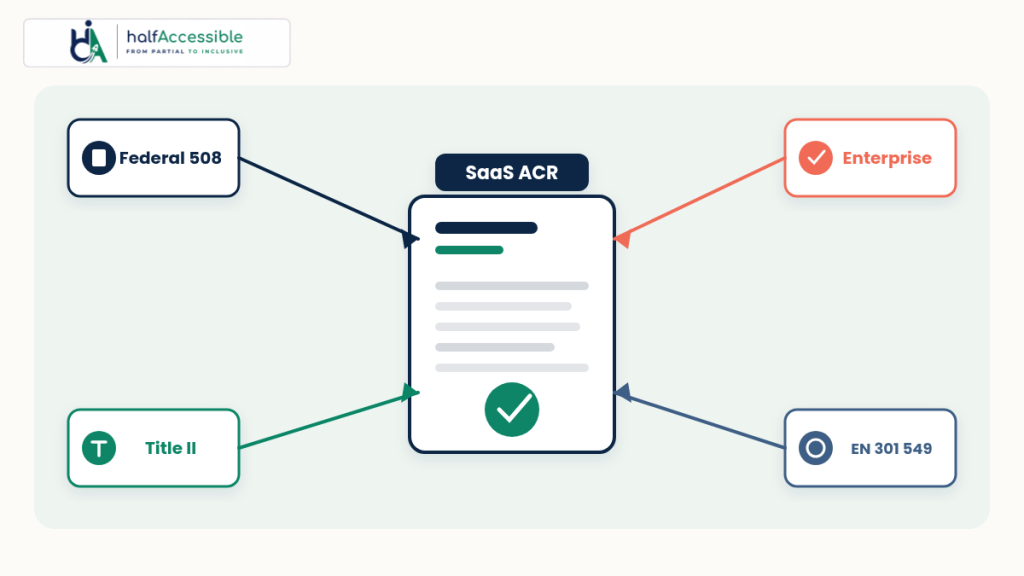
As of April 2025, ITI publishes VPAT® Version 2.5Rev in four editions (ITI VPAT page):
| Edition | Built for | WCAG version in that edition |
|---|---|---|
| VPAT 2.5Rev WCAG | Buyers who want WCAG reporting | WCAG 2.0, 2.1, and 2.2 |
| VPAT 2.5Rev 508 | U.S. federal / Revised Section 508 | WCAG 2.0 (as incorporated into 508) |
| VPAT 2.5Rev EU | EN 301 549 / EU public procurement | WCAG 2.1 (as incorporated into the EU edition) |
| VPAT 2.5Rev INT | Multi-market / “cover everything” RFPs | Incorporates 508 + EU + WCAG (includes WCAG 2.2 in the WCAG portion) |
Practical SaaS picks:
- Federal opportunity or 508 called out → 508 edition, or INT if the same ACR must also speak to EU/WCAG buyers (Section508.gov how-to).
- Commercial / edu RFP that says “WCAG 2.2 AA ACR” → WCAG edition (or INT).
- EU public sector or EN 301 549 named → EU edition (or INT).
- One ACR for global enterprise → INT, knowing it is longer and expensive to keep current.
Do not invent a fifth conformance story. Match the template to the contract language. For edition-specific testing help, HalfAccessible offers ADA / Section 508 accessibility audits and EU accessibility compliance audits.
Scope What to Test in a SaaS Product
An ACR that only covers the marketing site will fail the first procurement follow-up. Scope the product version named on the ACR title page — typically the production SaaS release buyers will log into.
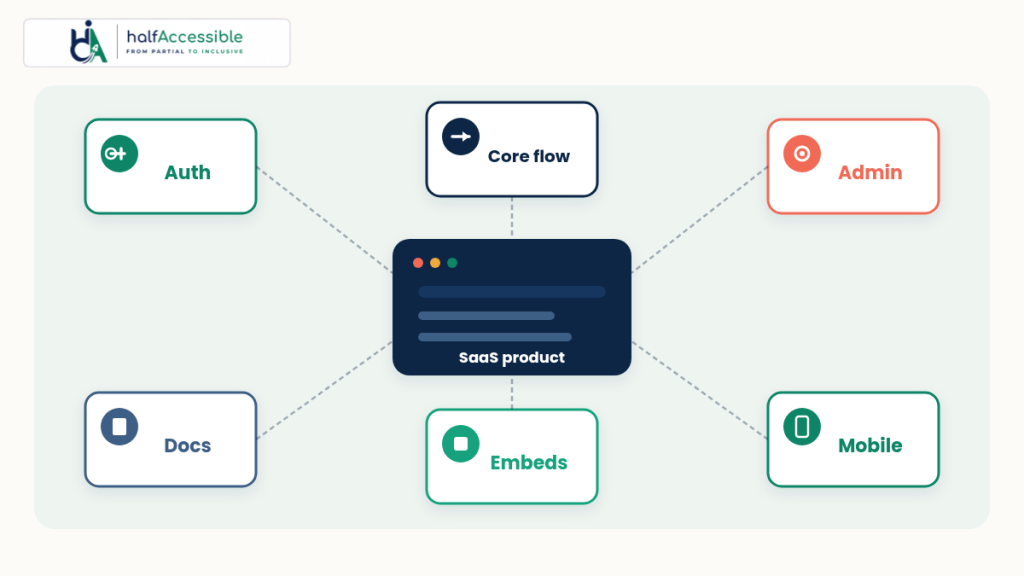
Minimum SaaS test surface for a credible ACR:
- Authentication — sign-up, sign-in, SSO, MFA, password reset, session timeout messaging
- Core customer workflows — the journeys that close deals (create → edit → share → export, or equivalent)
- Admin / settings — roles, billing, integrations, feature flags that customers actually configure
- Support content you own — in-app help, knowledge base articles you publish, PDF exports (Section 508 Chapter 6 covers support documentation and services when applicable)
- Third-party embeds — chat widgets, analytics overlays, payment iframes, media players you ship in the product chrome
- Responsive / mobile web — if customers use the product on phones and tablets; native apps need their own scoped rows or a separate ACR if you choose to split them
Name evaluation methods on the ACR: automated ruleset (if any), keyboard-only passes, screen reader platforms (for example NVDA, JAWS, VoiceOver), browsers, and whether testing was on production, staging, or a documented build. Section508.gov expects that field completed. Pair scanner output with manual testing — ADA.gov’s web guidance notes that automated checkers need careful use and that a “clean” report does not necessarily mean everything is accessible, and W3C WAI selecting tools guidance reminds teams that evaluation tools cannot check every accessibility aspect.
For React-heavy SaaS frontends, bake fixes into shared components via accessible React development so the next ACR refresh is not a heroics cycle.
Honest Conformance Levels and Remarks That Will Not Get You Redlined
ITI’s VPAT 2.5Rev uses four conformance levels (ITI; definitions also summarised by Section508.gov):
- Supports — at least one method meets the criterion without known defects (or meets with equivalent facilitation)
- Partially supports — some functionality does not meet the criterion (this phrase replaced the older “supports with exceptions” wording at the Access Board’s request, per ITI)
- Does not support — the majority of product functionality does not meet the criterion
- Not applicable — the criterion is not relevant to the product
Section508.gov requires remarks when the level is partially supports or does not support. Remarks are encouraged even when you support a criterion.
Remarks buyers accept:
- Name the affected feature or role (for example, “Admin → Integrations table: column sort buttons lack accessible names”)
- Tie the gap to a WCAG or 508 criterion
- State who is blocked (keyboard-only, screen reader, low vision) without drama
- Note workaround if one exists and is actually usable
- Point to a roadmap item or ticket ID when remediation is funded — never invent a ship date you cannot keep
Remarks that get redlined:
- “Supports” on criteria you never tested
- Copy-paste “N/A” across interactive UI
- Blaming the user’s assistive technology
- Claiming ITI or a scanner “certified” the product (ITI explicitly says there is no VPAT certification)
GSA also notes that even a product that conforms to relevant standards may still be difficult for some users, and a product that is not fully conformant may still work for others — the ACR’s job is accurate disclosure so buyers can compare options (ITI; Section508.gov FAQ). Incomplete accessibility does not automatically bar federal purchase; buyers compare ACRs. Silence loses.
Audit → Remediate → ACR: The Sequence That Protects Sales
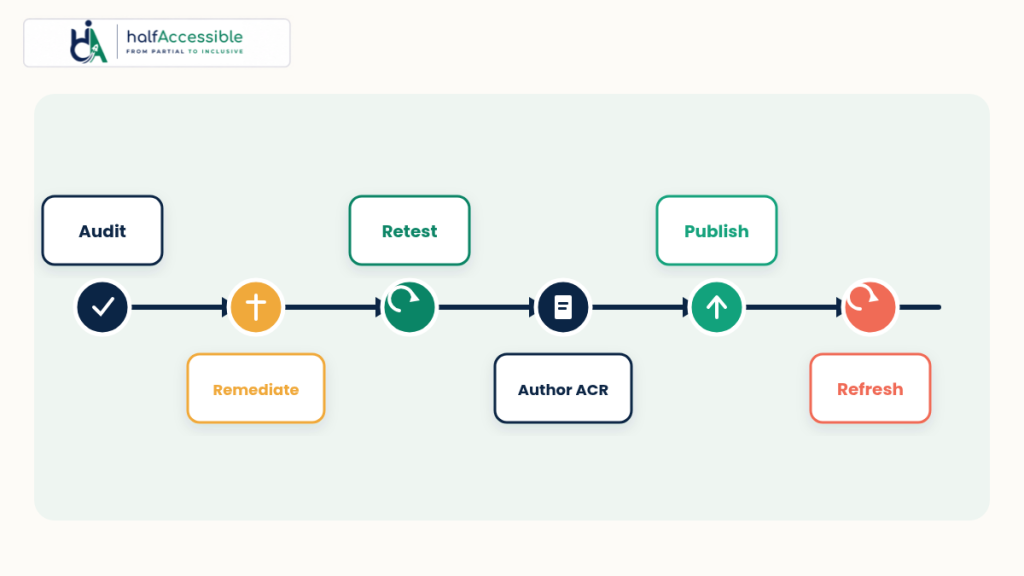
Do not start by typing “Supports” into a blank Word file. Credible SaaS ACRs follow a fixed order:
- Baseline audit — manual + assistive technology against the edition you will file (accessibility audit services, low-cost accessibility audit, or see a sample audit report)
- Remediate shared UI — design system, auth shell, data tables, modals, toasts (accessibility remediation)
- Retest the same scope with the same methods
- Author the ACR on the current ITI 2.5Rev edition (VPAT / ACR documentation)
- Publish or deliver — product page link for federal buyers (Section508.gov recommends making the ACR easy to find) plus NDA’d RFP packages when required
- Govern — tickets for residual “partially supports” rows so sales does not promise fixes engineering never scheduled
Target engineering hygiene at WCAG 2.2 Level AA even when a 508 edition still tabulates WCAG 2.0: you report against the edition’s tables, but building ahead reduces rework when buyers ask for 2.2 evidence.
Refresh Cadence (Best Practice, Not an ITI Mandate)
ITI does not publish a mandatory annual VPAT renewal clock. Treat refresh as product hygiene tied to change:
- The Section508.gov ACR/VPAT FAQ states that every time your product is changed or updated (version change, bug fix, and similar), an updated ACR may be required to address accessibility changes — and that ACRs written only to the original (2001) Section 508 standards must be redone against the Revised Section 508 Standards (2017).
- Practical SaaS pattern: refresh after major releases that touch auth, navigation, or high-traffic workflows; refresh when a buyer RFP demands a report newer than N months; schedule at least an annual review so sales is never handing out an ACR for a version you no longer ship.
- Keep the report date, product version, and evaluation methods truthful. A beautiful ACR for last year’s UI is a liability.
Get a VPAT for SaaS Buyers Will Actually Read
Enterprise and government deals stall when the only accessibility artefact is a vague WCAG claim. A trustworthy VPAT for SaaS path is straightforward: pick the April 2025 edition that matches the RFP, scope real product workflows, test with assistive technology, remediate shared UI, then file an honest ACR with remarks you can defend.
HalfAccessible helps SaaS teams run that sequence end to end — accessibility audits, remediation, accessible React development, and VPAT / ACR documentation scoped for SaaS B2B software. See how that looks on a live product in our VPAT for SaaS Happeo case study and the sibling accessibility audit and VPAT for SaaS engagement.
Book a consultation, start a low-cost accessibility audit, review accessibility audit pricing, browse all accessibility services, or open a sample audit report to see how findings become ACR-ready evidence. Reports are authored by IAAP-aligned professionals who test with assistive technology — including NVDA — not scanners alone.